Know where
your AI projects
stand.
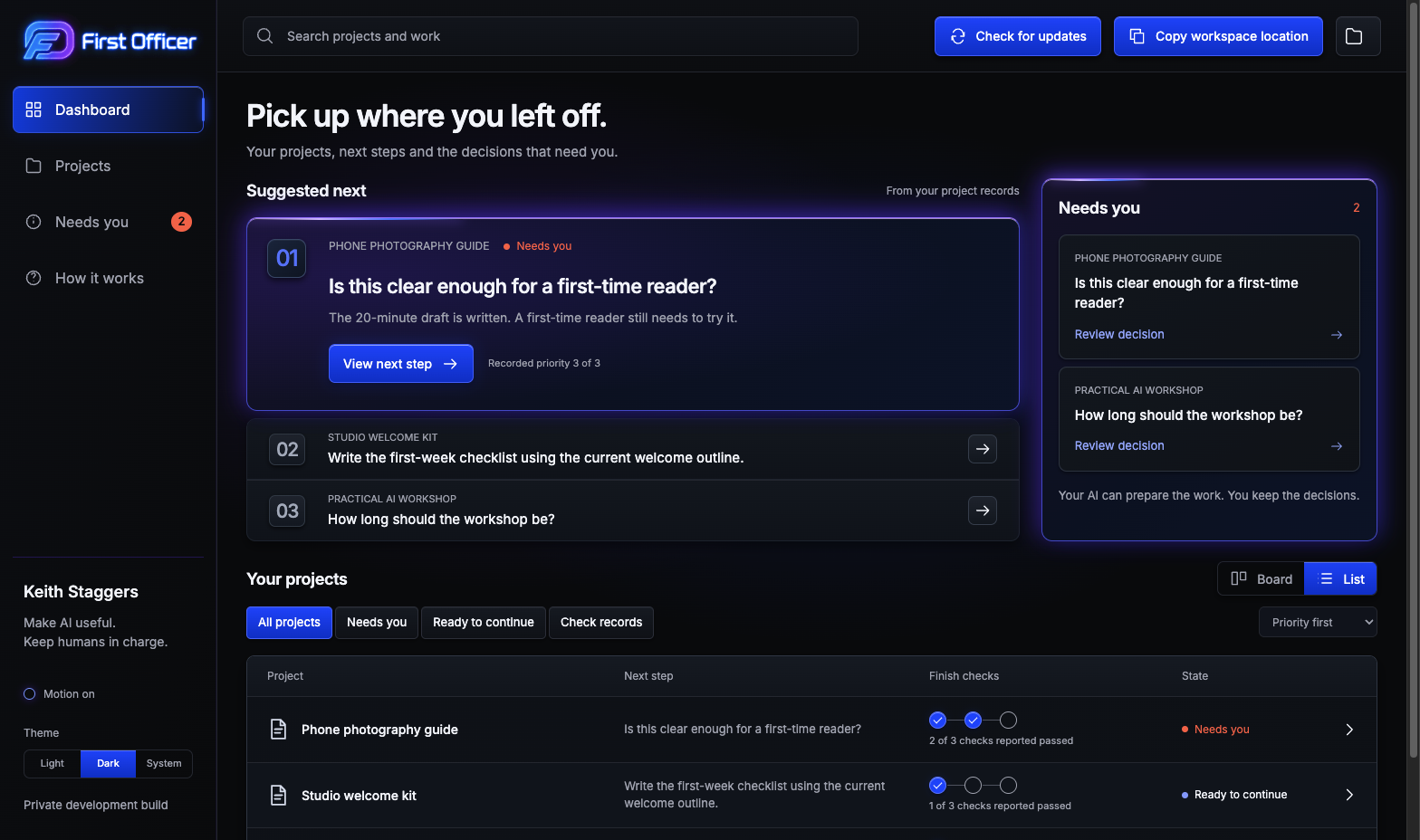
A desktop project dashboard for work you do with AI. See your projects, decisions and next steps in one place.
Choose your downloadFree early release · Mac and Windows
Less managing AI. More finished work. You’re still in charge.
Get First Officer
Mac dev.33: read the Mac setup and release limits. Windows dev.19: read the installation help and release limits before installing.
Mac with Apple silicon
macOS 13 or later · Apple M-series chip
Downloads are not open yet.
DownloadFinal release checks are still in progress.
File details
File fingerprint (SHA-256)
This identifies the download file. It is not a security guarantee.
Installation steps
When the download is available:
- Download the Mac ZIP and open it.
- Move First Officer to Applications.
- Open First Officer from Applications and choose Set up my workspace.
If First Officer is already installed, read the update instructions below first. If your computer reports a security warning, stop and note the exact message. Do not disable its protections.
Keep using your AI. Give the work a home.
Mac dev.33 creates projects and connects your AI inside the app. Windows dev.19 still uses the external-AI workflow described in its installation help.
Set up your workspace
Open First Officer and choose Set up my workspace. Pick a location for the new folder.
Create a project
On Mac dev.33, choose Create my first project. Add a name and a short description of what you want to make.
Connect and draft
Choose Codex, Claude or Gemini, finish connecting, then click Continue. Answer questions in the app and review each saved draft.
Pick up where you left off
Reopen your workspace to see saved drafts and answers. On Mac dev.33, add feedback to request a revision or switch AI while work is paused.
Something to try first
Ask your AI to help plan a three-day trip. Your itinerary, unfinished tasks and decisions can then live with the project.
Help me draft a simple three-day trip itinerary. Ask me about the destination and budget first.
On Mac dev.33, use this as your new project description. On Windows dev.19, follow its setup help to give your external AI access to the workspace.
A little help, when you need it.
Is First Officer free?
This early release is free to use. The development source is kept private. Your existing AI service may have its own charges; First Officer does not include that service.
Which AI can I use?
Mac dev.33 connects Codex, Claude and Gemini for text drafting. Codex needs an existing official Codex installation. Claude signs in through included Claude Code. Gemini uses a Google AI Studio API key. Your provider’s limits, data policies and billing apply.
Windows dev.19 uses an external AI app with local-folder access. A web chat does not gain access just because you paste a folder path.
What does Check for updates do?
It reads the latest saved project records. It does not update the First Officer software, contact your AI or finish a task.
Ask your AI to keep those records up to date. If it skips an update, the dashboard can be out of date too. A reported result is not independent proof that the work is finished.
Does the app approve AI changes?
No. It helps you see recorded work and decisions. It cannot stop an outside AI from changing files it already has permission to edit.
Mac dev.33 saves connected-drafting answers in the app. Clicking Continue, Answer & continue or Continue with feedback sends the selected project context to your chosen provider. Review drafts before using them. Windows dev.19 uses Copy for my AI for external replies.
How will I update the app?
Updates are manual. Get the newer package from this download page, quit First Officer normally, then follow that release’s installation instructions. Refresh (Check for updates in older versions) only refreshes project records.
Keep your workspace folder. Do not delete it to update the app. If the new release has special steps or changes its requirements, read those before installing.
What if the app opens an earlier workspace?
Choose Folder at the top of the app. Choose Create another workspace for a new folder, or Use another workspace to open one you already have. You do not need to delete your settings or start over.
Is this an early release?
Yes. Keep backups and start with a non-sensitive project. The dashboard depends on saved records being kept up to date. Wider assistant compatibility, accessibility and operating-system coverage are still being evaluated.
App settings and saved replies may be stored separately from the workspace. Copying the workspace alone is not a complete app backup.
Tell us what got in the way
Prepare a short problem report without including private project content.