Article · 04 / Using AI at work
How Do You Hand Off an AI Workflow Safely?
Hand off an AI workflow only after the new owner can run it, recognize when to stop, recover without creating duplicate actions, and explain who remains accountable. Give that person a one-page operating record, then watch them complete a normal case and a failure drill without help from the builder.
Jump to the worked example and free worksheet ↓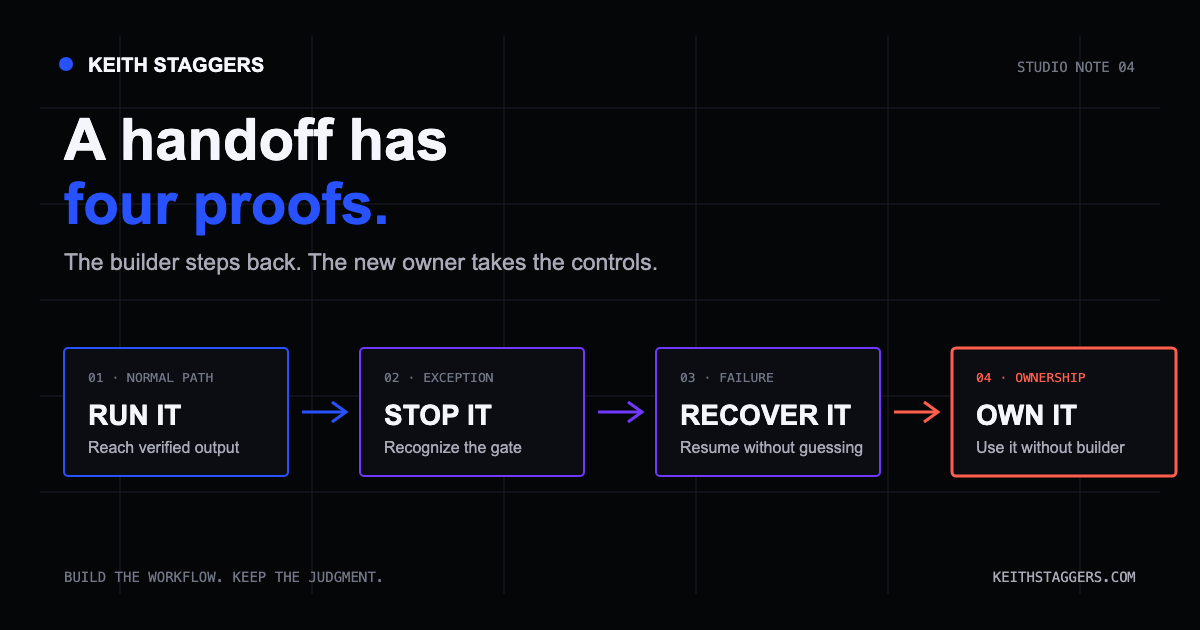
In brief
Run. Stop. Recover. Own.
Hand off an AI workflow only after the new owner can run it, recognize when to stop, recover without creating duplicate actions, and explain who remains accountable.
- Give the operator one page naming the approved inputs, AI step, human check, output, stop rules, fallback, evidence, and owners.
- Make the operator demonstrate a normal case and a failure case without quiet rescue from the builder.
- Check whether an outside action already happened before any retry.
- Retest after changes to the model, tool, data, integration, reviewer, or consequence.
Try this at your next handoff: give the receiving person the instructions and a sample task, then let them drive. Notice when you have to explain a file location, supply a missing step, or say, “That warning is normal.” Each interruption identifies knowledge the handoff still needs.
The builder knows how to make the demonstration work. The receiving person needs enough information to handle an ordinary run and an awkward one without guessing what the builder intended.
Use four checks: Run. Stop. Recover. Own. They turn the handoff into something you can observe. The NIST AI RMF Core provides the broader basis for clear roles, testing, monitoring, override, incident response, recovery, and change management.
Run: can the operator complete a normal case?
The handoff record should answer:
- What starts the process?
- Which tool, account, source, and template are approved?
- What information is allowed and prohibited?
- What does AI do, and what must a person do?
- What does a good output look like?
- What evidence must the reviewer check?
- Where does the approved result go?
Write actions, not project shorthand. “Open the approved weekly notes in Folder A” is more useful than “run the Monday flow.” Link to the controlled source, the current instructions, and the place where completion is recorded.
The operator should be able to complete one ordinary case while the builder stays silent. Questions during training are welcome; invisible rescue during the final demonstration is evidence that the handoff is not finished.
Stop: can the operator recognize a boundary?
“Use judgment” and “be careful” do not define a stop condition. A stop condition is visible and connected to a next action.
Examples include:
- the source is missing, stale, or conflicts with another approved source;
- the input contains information the workflow is not permitted to process;
- the required human reviewer is unavailable;
- the output contains an unsupported name, number, date, citation, or instruction;
- a connection fails before the operator can confirm whether an outside action occurred;
- the requested use is different from the approved purpose; or
- the output falls outside an agreed quality or safety threshold.
For every stop condition, say what the person should do: hold the draft, move to the manual path, ask the named owner, or record an incident. A stop rule without a next action merely relocates the guess.
Recover: can the operator finish safely after failure?
Recovery begins by checking what already happened. Retrying before checking may send a duplicate message, create a second record, publish twice, or overwrite the usable result.
The recovery record should identify:
- the evidence that proves whether an outside action happened;
- the last confirmed safe step;
- the manual path for completing essential work;
- the place to record the exception without copying restricted information; and
- the person who decides whether normal operation may resume.
NIST describes contingency planning as a coordinated set of plans, procedures, and technical measures that support recovery after disruption. Its guidance includes alternate manual processing for some short-term disruptions. See NIST SP 800-34 Rev. 1.
A fallback that depends on an inaccessible password, unavailable employee, missing template, or untested permission is not a fallback yet.
Own: is accountability visible?
Name roles rather than writing “the team.” A small workflow may need one person in several roles, but the responsibilities should still be explicit:
- Operator: runs the approved steps and stops on a defined condition.
- Reviewer: checks the evidence and accepts, corrects, or rejects the output.
- Process owner: approves material changes and decides when a failed workflow may resume.
- Support or escalation owner: handles access, security, privacy, or technical incidents.
The tool is not the owner. The builder is not automatically the owner after handoff. Accountability belongs to people who have the authority and time to act.
The one-page AI workflow handoff record
Keep this beside the process:
| Field | What to write |
|---|---|
| Purpose | The one job this workflow is approved to do |
| Trigger | The event that starts a run |
| Inputs | Allowed sources and explicitly prohibited information |
| AI step | What the tool produces or changes |
| Human gate | Who reviews what evidence before the next action |
| Output | Format, destination, and definition of complete |
| Stop conditions | Specific visible reasons not to continue |
| External actions | Messages, updates, charges, publications, or other consequences |
| Fallback | The ordinary path that completes essential work |
| Duplicate check | Evidence to examine before any retry |
| Owners | Operator, reviewer, process owner, and escalation contact |
| Evidence | Where approvals, exceptions, and completion are recorded |
| Version | Date, approved configuration, and next review date |
Do not paste secrets or private source material into the handoff record. Point to the controlled location and describe the access needed.
Try the handoff with a project email
Imagine a small team uses AI to draft a project follow-up email from approved, nonconfidential meeting notes. The email cannot send itself.
Ask the new owner to demonstrate four cases:
- Run: create and verify a normal draft.
- Stop: identify an invented deadline and reject the draft.
- Recover: respond to a timeout by checking the sent folder and workflow record before deciding whether to retry.
- Own: explain who approves changes, who handles a failure, and who authorizes the next normal run.
Use sample names, a practice mailbox, and outside actions turned off.
Handoff acceptance criteria
The workflow is ready for transfer when the new owner can, without builder assistance:
- find the approved source and instructions;
- complete a normal case;
- perform the required human check;
- state the prohibited inputs;
- recognize at least one stop condition;
- confirm whether an outside action already occurred;
- use or explain the manual fallback;
- record an exception; and
- name the person who decides whether the process resumes.
Write down each point where the receiving person needed help. Fix that instruction or access problem, then repeat the affected case. At the next run, the useful result is fewer interventions from the builder, with the same checks still completed.
Limitations
A handoff test proves that one person can operate the documented version under the tested conditions. It does not prove that the model will remain stable, that every edge case has been found, or that the workflow meets every legal, privacy, security, clinical, accessibility, or organizational requirement.
Retest after changes to the model, prompt, tool, data source, integration, destination, reviewer, or consequence. The NIST Generative AI Profile emphasizes pre-deployment testing, incident disclosure, and continuing risk management for generative AI systems.
Primary sources
- NIST AI Risk Management Framework
- NIST AI RMF Core
- NIST Artificial Intelligence Risk Management Framework: Generative AI Profile
- NIST SP 800-34 Rev. 1: Contingency Planning Guide
Written by Keith Staggers, AI trainer, workflow builder, nurse leader, and author. Last reviewed August 20, 2026.
Put it to work
A one-page handoff the next person can use
A useful handoff lets the next person act without guessing. Here is a filled example for the event-listing task, followed by a blank card to download.
Practice setup: the event coordinator hands a drafting task to a backup coordinator. Both use an approved public event brief and a shared draft folder. Sending and publishing are disabled during the exercise.
- Run
- Open the approved brief. Draft up to 100 words. Save the draft beside the brief. Compare the date, time, location, audience, price, and link before marking it ready for review.
- Stop
- Stop for missing or conflicting facts, an unsupported promise, unexpected access requests, or a missing save confirmation. Do not invent a fact or mark an unchecked draft approved.
- Recover
- Check whether a draft was saved before rerunning. If the tool is unavailable, write from the brief in a plain document and complete the same checks. Keep one clearly named final version.
- Own
- The event coordinator owns the decision. The backup drafts and records exceptions. Publication would require a separate approved step outside this practice exercise.
- Prove the handoff
- Have the backup complete one normal case and one missing-time case without coaching. Keep the two records, any missed step, and the owner's accept-or-revise decision.
The handoff is ready when the new operator can demonstrate the process and its stop condition. A document that nobody has used is still an untested instruction.
Free text file. No email needed. Opens in any text editor.What to do next
Related resources and services.
- See the done-for-you AI setup → Keith builds and tests one repetitive task in tools and accounts your team controls.
- See if a task is ready for AI → Confirm that the task has a responsible person, a clear result, test examples, and a backup plan.
- Use the ten-case testing worksheet → Test normal work, mistakes, safety stops, duplicate work, human rejection, and the manual backup plan.
- See examples of Keith's work → Plain-English records of independent AI projects and finished work.
Use this idea