Article · 07 / Using AI at work
Test the manual fallback before it fails
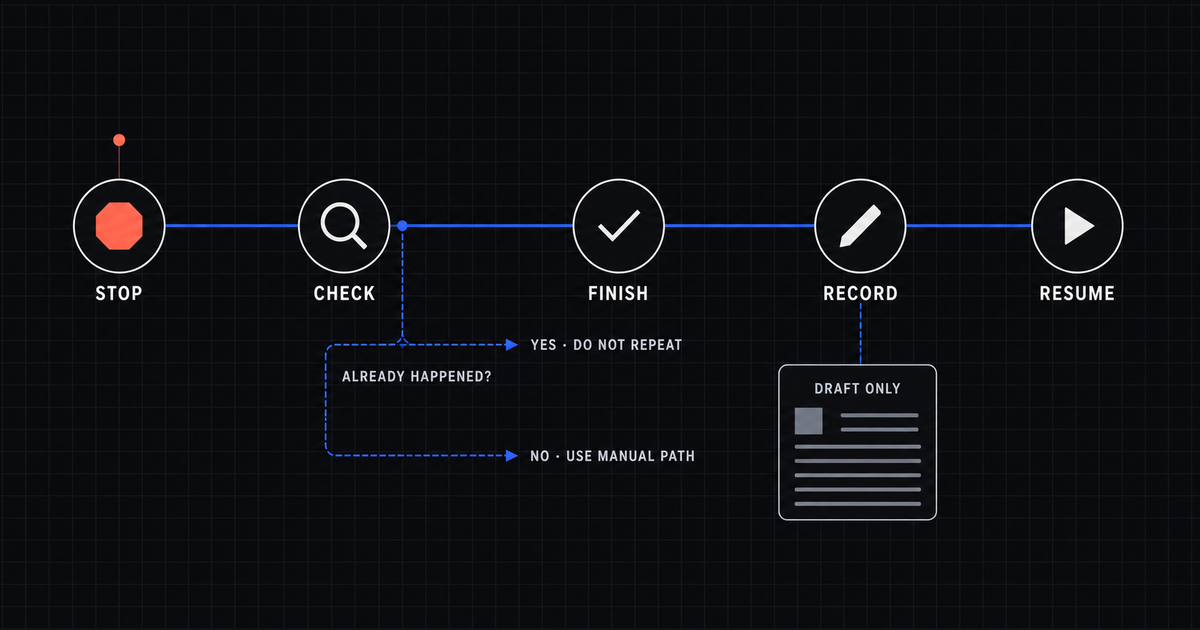
When an AI-assisted process fails, “do it manually” is not enough. A usable fallback is a short, written path that tells one person when to stop, what to check, how to finish the work safely, what to record, and when the normal process can resume.
The fastest way to find out whether that path works is to practice it for five minutes with sample information and every outside action turned off.
01
Start with a failure people already recognize
Imagine a small team uses an AI tool to turn weekly project notes into a follow-up email and action list. The normal process looks simple:
- A manager adds the meeting notes.
- AI drafts the email and action list.
- A person checks the facts, owners, and dates.
- The approved email is sent.
- The team records that the follow-up went out.
Now the tool times out after step three.
Did the email send before the screen failed? Is the draft saved? If the manager starts over, will the team receive two messages? Can another person find the latest checked version?
Those questions are the fallback. “Write the email yourself” answers only one of them.
02
A fallback has five jobs
A fallback is the safe alternative used when the normal process cannot finish. It should fit on one page and answer five ordinary questions.
| Job | Question the operator needs answered |
|---|---|
| Stop | What exact failure means I should stop the normal process? |
| Check | How do I confirm what already happened? |
| Finish | What short manual path completes the essential work? |
| Record | Where do I note what happened and what I did? |
| Resume | Who decides the normal process is safe to use again? |
For the project-email example, the path could be:
- Stop after a timeout or missing confirmation. Do not press send again.
- Check the sent folder, the message record, and the approved draft location.
- If nothing was sent, copy the checked draft into the ordinary email tool and send it once.
- Record the time, recipient list, final file, and whether the manual path was used.
- Let the named process owner decide when the AI-assisted route resumes.
The point is not to create a thick emergency manual. It is to remove the next dangerous guess.
03
Practice with every consequence turned off
A consequence is an outside result such as sending an email, updating a customer record, publishing a page, or creating a charge. During the drill, disable those actions. Use sample names, a practice mailbox or unsent draft, and a test record that cannot affect real work.
Then run this five-minute drill.
Minute 1: Name the failure
Tell the operator the AI step is unavailable. Do not explain the workaround yet.
Ask: “What tells you to stop?”
The answer should point to something visible, such as a timeout, missing confirmation, or failed status. “It looks wrong” is too vague.
Minute 2: Check for a partial run
Create one partial-run case. In the sample, the draft exists, but the operator does not know whether the email was sent.
Ask the operator to check the place that proves the outside action. A spinner or success message is not enough. For email, the proof might be the sent folder and message record. For a published page, it might be the live public URL. For a payment, it would be the payment provider’s completed transaction record.
This check matters because retrying before you know what happened can create a duplicate.
Minute 3: Use the manual path
Have the operator complete only the essential work through the approved ordinary tool.
In the sample, they open the checked draft in the regular email tool, confirm the recipient list, and stop before the practice email is sent. The drill proves the path without contacting anyone.
If the fallback depends on a password, permission, file, or person the operator cannot access, the fallback is not runnable yet.
Minute 4: Record the exception
Ask the operator to record four facts:
- what failed;
- what evidence they checked;
- which path they used;
- what remains unfinished.
Do not copy private source material into the record. The record should explain the state of the work, not duplicate the sensitive input.
Minute 5: Decide how normal work resumes
The person doing the fallback should not have to guess when the AI-assisted route is safe again.
Name the owner who reviews the failure, confirms the fix, and authorizes the next normal run. If nobody owns that decision, the team will either avoid the process forever or restart it too soon.
04
Test the duplicate case on purpose
The most useful fallback test is often not a total outage. It is a partial run where one step may have succeeded.
Use at least two practice cases:
- Nothing happened. The AI tool failed before creating the draft.
- Something may have happened. The draft exists, and the outside action is uncertain.
The second case forces the operator to check evidence before retrying. That is what protects customers, coworkers, and the business from duplicate messages, repeated updates, or accidental charges.
If the only instruction is “try again,” the process has no real recovery path.
05
What a passing drill looks like
The fallback passes when a person who did not design the process can:
- recognize the stop signal;
- find the evidence of what already happened;
- complete the essential work without the AI step;
- avoid a duplicate outside action;
- record the exception without copying restricted information; and
- name who decides when normal work resumes.
Any hesitation is useful evidence. Fix the page, permission, label, or ownership gap while the practice run is harmless.
A written fallback is still only a claim until somebody else can follow it. This is the same reason an AI workflow is not finished until another person can run, stop, and recover it.
06
Check one repeated job
Choose one repeated job your team already uses. Ask what happens if the AI step or connected tool is unavailable for ten minutes.
If the answer depends on memory, one unavailable person, or pressing retry and hoping, the next step is not more automation. Write and practice the short manual path first.
Use the free workflow readiness check to see whether the job has a named owner, approved information, a human decision, and a usable fallback. If the work is ready for outside help, Keith offers done-for-you AI setup for repeated team tasks.